
Google Images indexing
I am pretty happy to see the results of my SEO initiatives for my digital blog today.When I searched "peacock.wallpaper" in Google I can see one of my pictures from my digital photo blog added in Google's first page in the images list.
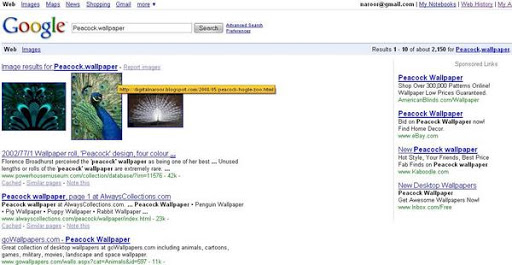
This can really fetch me more traffic to my website and indeed its giving me good traffic.
I recently added the Live feed java script code which gives me the details of the visitors LIVE.I can find that lot of my visitors are brought in from Google Images and I can see my SEO tricks are working and I thought I will share some of my thoughts on how to get indexed in Google Images .
The two most important steps in before adding images to your website /blog which eventually gets you indexed in Google Images are :
Always keep in mind to name the file with appropriate keywords .Also fill the alt attribute for all the img tags.
Also there is a method to direct Google to add your images to Google Image search. Login to your webmaster tools and go to tools/Enhanced Image Search .
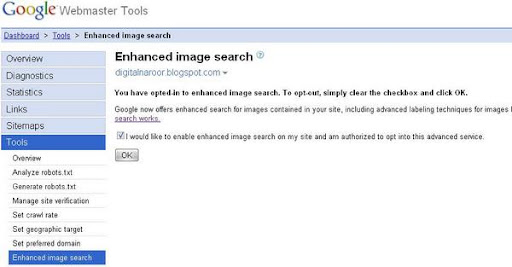
Select the check box for fast indexing of your images.
This can really fetch me more traffic to my website and indeed its giving me good traffic.
I recently added the Live feed java script code which gives me the details of the visitors LIVE.I can find that lot of my visitors are brought in from Google Images and I can see my SEO tricks are working and I thought I will share some of my thoughts on how to get indexed in Google Images .
The two most important steps in before adding images to your website /blog which eventually gets you indexed in Google Images are :
- Name of the image file
- Alternate text for the img tag (the alt attribute)
Always keep in mind to name the file with appropriate keywords .Also fill the alt attribute for all the img tags.
Also there is a method to direct Google to add your images to Google Image search. Login to your webmaster tools and go to tools/Enhanced Image Search .
Select the check box for fast indexing of your images.
posted by Ratish Naroor at
1:56 PM


3 Comments:
Great work.
Useful stuff.. however, there is no option called 'enhanced image search' in my webmaster section. Is there anything else that I need to do before I get to this? Thx.
Wow, great information. I could say my knowledge in seo is already broad but I find it nice to see people giving out tips and new information.
Post a Comment
Subscribe to Post Comments [Atom]
<< Home